Blog ComparisonsManychat Pricing 2026: Plans, Fees, and Real Costs
Manychat Pricing 2026: Plans, Fees, and Real Costs
Explore Manychat pricing, compare Free through Advanced, and understand active-contact overages, AI, WhatsApp fees, and legacy plans.


✨ Psst... Looking for a modern & affordable alternative to Manychat? Check out Featurebase →
Thinking about using Manychat to automate customer conversations or run WhatsApp marketing campaigns - but not sure what it'll actually cost?
Manychat's paid plans now start at $17/month, or $14/month billed annually. Your bill depends on the plan, monthly active contacts, and messaging fees. Older accounts may still use a different pricing model.
In this guide, I'll break down Manychat's 2026 pricing, explain the extra charges, and show what different businesses could actually pay. 👇
Key takeaways
- Five current plans: Free, Essential, Pro, Business, and Advanced. Monthly paid plans start at $17, $39, $99, and $199 respectively.
- Annual billing has a lower monthly equivalent: The advertised rates are $14, $29, $69, and $139 per month, but you pay for the year upfront.
- Active contacts determine usage charges: Each plan includes a monthly allowance. Stored contacts who remain inactive don't count toward it.
- AI is included on Pro and above: The $29 AI add-on belongs to legacy pricing, not the new Pro plan.
- Messaging can add separate costs: Budget for WhatsApp delivery, SMS provider charges, and email usage beyond your allowance.
- Featurebase✨: An option for teams focused on customer support, combining AI-powered support with feedback and product tools.
What is Manychat?
Manychat is a chatbot and marketing automation platform used by brands to engage customers through Facebook Messenger, Instagram, WhatsApp, and more. It lets you build automated live chat flows with a drag-and-drop builder, send campaigns, and manage live customer conversations across multiple channels in one place.
It's popular among ecommerce brands and marketers who want to automate lead generation, customer support, and promotional campaigns without any coding skills.
Manychat pricing plans in 2026
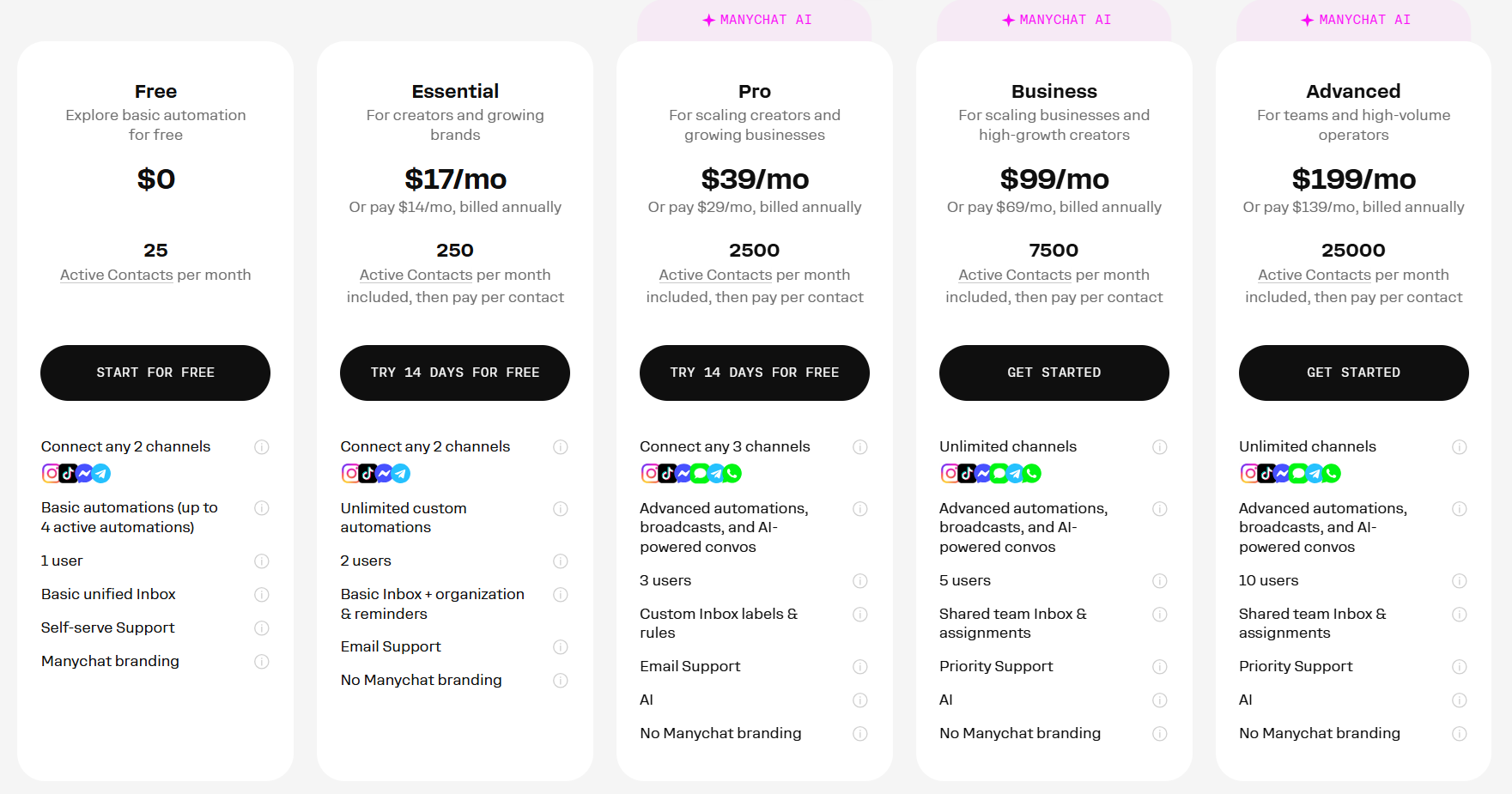
Manychat offers Free, Essential, Pro, Business, and Advanced plans under its new pricing model. Each comes with a monthly active-contact allowance, channel limits, and team access.
The table below covers published USD web subscription prices before taxes. Prices and availability can vary by country. Mobile in-app subscriptions have different conditions and don't include WhatsApp, SMS, or email.
| Plan | Monthly billing | Per month, billed annually | Active contacts/month | Main limits and features |
|---|---|---|---|---|
| Free | $0 | $0 | 25 | 4 live automations, 2 channels |
| Essential | $17 | $14 | 250 | Unlimited automations, 2 channels |
| Pro | $39 | $29 | 2,500 | AI included, 3 channels |
| Business | $99 | $69 | 7,500 | Unlimited eligible channels, team routing |
| Advanced | $199 | $139 | 25,000 | Larger team, lower contact overage rates |
Annual subscriptions cost $168, $348, $828, or $1,668 upfront, respectively. Contact allowances still reset monthly, and extra-contact charges are billed monthly.
Free plan ($0/month)
The Free plan is for testing a small automation before committing to a subscription. It includes:
- 25 active contacts per month
- Up to 4 live automations
- 2 channels from Instagram, TikTok, Facebook Messenger, and Telegram
- 1 user and 1 Inbox seat
- Manychat branding
That's enough to experiment with comment replies or simple DM flows. With only 25 active contacts, it offers limited room for an ongoing campaign.
Essential plan ($17/month)
Essential raises the allowance to 250 active contacts and removes the limit on the number of automations. It includes 2 users, 1 Inbox seat, and 2 eligible social channels.
You can collect email addresses and phone numbers, organize contacts with tags, and send lead information to Google Sheets. However, collecting an email address doesn't mean the plan includes email campaigns. WhatsApp, SMS, email sending, and AI require a higher plan.
Pro plan ($39/month)
Pro includes 2,500 active contacts, AI-powered automation, and up to 3 channels. WhatsApp, SMS, and email become available alongside the supported social channels.
It also includes 3 users, 2 Inbox seats, and more integrations. A third Inbox seat costs $25/month if another teammate needs to handle conversations.
Pro is the first plan to consider when you need AI or messaging beyond the basic social channels. If you're still assessing the product itself, our Manychat review covers its broader strengths and limitations.
Business plan ($99/month)
Business includes 7,500 active contacts, unlimited eligible channel connections, and more tools for managing conversations as a team.
You get 5 users and 3 Inbox seats, with up to 2 additional Inbox seats available at $25/month each. Lead routing and advanced Inbox controls make it more suitable for teams sharing a larger conversation workload.
Advanced plan ($199/month)
Advanced includes 25,000 active contacts, 10 users, and 5 Inbox seats. You can add up to 5 more Inbox seats at $25/month each.
Its lower extra-contact rate is particularly relevant for high-volume accounts. Custom arrangements may be available at larger volumes, so the standard published price isn't necessarily the final quote for every business.
What happened to the old $15 Pro plan?
Manychat introduced the new model on March 2, 2026. It applies by default to accounts created on or after that date, with availability for older accounts rolling out by country.
Some existing customers therefore still see the older Free, Pro, and Elite structure, including Pro starting at $15/month and pricing based on total contacts. Check which model your account uses before comparing your invoice with the table above.

Get the best modern ManyChat alternative
Automatically resolve 70% of customer requests & cut down manual support loads
How Manychat active-contact billing works
An active contact is someone you exchange messages with during your billing cycle through Manychat, including automations, AI, broadcasts, and Inbox conversations. Sending several messages to the same contact doesn't create several active contacts within that cycle.
This changes how you should estimate costs. A stored list of 20,000 people with 2,000 active contacts has different subscription usage from a campaign that reaches all 20,000.
A person interacting on multiple platforms may count separately unless Manychat recognizes matching contact details, such as their email address or phone number.
Extra-contact charges
When you allow contacts beyond your plan's included allowance, overage rates depend on your plan and billing cycle:
| Plan | Each extra contact, monthly subscription | Each extra contact, annual subscription |
|---|---|---|
| Essential | $0.10 | $0.082 |
| Pro | $0.05 | $0.038 |
| Business | $0.025 | $0.018 |
| Advanced | $0.004 or less | $0.0028 or less |
These are charges for additional active contacts, separate from any WhatsApp, SMS, or email delivery charges.
You can set a maximum number of extra contacts, including zero. Once that threshold is reached, automations can continue for contacts already active in the cycle, but new contacts can't enter those conversations until capacity becomes available.
Your allowance resets on your monthly billing date, including when you pay annually. It doesn't automatically reset on the first day of the calendar month.
Tip: Compare the next plan's base price with your expected overages. The plan with the lowest advertised fee can cost more once a campaign takes off.
WhatsApp, SMS, and email costs
Contact allowances and message delivery are separate parts of your budget. A single person can count as 1 active contact while receiving multiple billable messages.
For an omnichannel customer engagement campaign, estimate each channel's delivery costs alongside your subscription.
WhatsApp pricing
On eligible web subscriptions, WhatsApp is available from Pro upward. Template-message charges depend on the message category, recipient's country, and number of messages delivered.
There is also a service-message change to account for:
- Through September 30, 2026: Non-template service messages are free.
- Starting October 1, 2026: Each WhatsApp Business phone number gets 1,000 free service messages per calendar month. Additional service messages are charged at the applicable destination rate.
- Incoming messages remain free: Messages customers send to your business don't create an incoming-message fee.
For example, the published UK rates effective October 1 are $0.0730 per marketing message, $0.0253 per utility message, and $0.0220 per billable service message.
Qualifying free-entry-point windows can make outgoing messages free, so don't apply these rates indiscriminately to every conversation. WhatsApp charges are deducted from your Manychat Wallet, and the pause on marketing templates to US numbers also affects campaign availability.
SMS pricing
Manychat's SMS integration uses Twilio, which handles SMS billing. Your costs depend on the destination, message segments, and applicable provider charges, so there isn't one universal SMS rate to add to every Manychat plan.
If all you need is SMS, a dedicated mass text messaging app may be a better fit than paying for a broader social automation platform.
Email pricing
The current web-plan comparison lists these monthly email allowances:
- Pro: 10,000 emails
- Business: 30,000 emails
- Advanced: 100,000 emails
Don't apply the older “10 times your contact limit” allowance to these plans. If you expect to exceed your included emails, confirm the additional sending rate for your account before budgeting a large campaign.
✨ Switch from Manychat to get a transparent pricing & the fastest AI-powered support platform →
Manychat AI features pricing
AI is included in the new Pro, Business, and Advanced plans. You don't need to add another $29/month to their subscription prices just to access Manychat's included AI features.
Free and Essential don't include that AI access. For those accounts, moving to Pro changes both the available features and the active-contact allowance.
Legacy accounts can have different terms, including the older $29/month AI add-on. Check your account's plan before treating that charge as an error or assuming it applies to every customer.
For customer service automation, evaluate the actual job you need the AI to handle, such as answering common questions or handing a conversation to a teammate. Included AI doesn't remove contact overages or channel delivery fees.
What your Manychat bill could look like
Here are 3 illustrative budgets using monthly web subscriptions, with taxes excluded. Each example states its contact count and extra usage so you can replace the assumptions with your own.
Example 1: A creator with 1,000 active contacts
A creator runs Instagram automations and reaches 1,000 active contacts in a month. They allow enough extra contacts to continue beyond Essential's 250-contact allowance.
Essential total: $17 + (750 × $0.10) = $92/month.
Pro total for the same contact count: $39/month, with all 1,000 contacts inside its 2,500-contact allowance.
Neither calculation includes paid message delivery or extra Inbox seats. In this scenario, Pro is the cheaper subscription even before considering its AI features.
Example 2: An ecommerce brand using WhatsApp
A brand has 10,000 active contacts on Business. Its ecommerce chatbot campaigns include 2,000 delivered UK marketing messages linking customers to its product catalogue.
Assume all 2,000 marketing messages are billable, use the published $0.0730 rate, and reach people already included in the 10,000 active-contact total:
- Subscription: $99
- Extra contacts: 2,500 × $0.025 = $62.50
- WhatsApp marketing delivery: 2,000 × $0.0730 = $146
Total: $99 + $62.50 + $146 = $307.50/month.
Additional billable service messages, SMS, or extra email usage would increase that total. AI is already included.
Example 3: An agency running a high-volume client account
An agency manages one client account on Advanced with 30,000 active contacts and 7 teammates who need Inbox access. The plan includes 5 Inbox seats, so it needs 2 extra seats.
Using the standard monthly contact rate, before any custom volume discount:
- Subscription: $199
- Extra contacts: 5,000 × $0.004 = $20
- Extra Inbox seats: 2 × $25 = $50
Total: $199 + $20 + $50 = $269/month, before channel delivery fees.
When presenting that budget to a client, a digital pitch deck maker can help separate the subscription, contact usage, and messaging assumptions into clear slides.
Overview table
| Example | Active contacts | Plan | Included extras in calculation | Monthly total |
|---|---|---|---|---|
| Creator | 1,000 | Pro | None | $39 |
| Ecommerce brand | 10,000 | Business | Contact overages + 2,000 UK marketing messages | $307.50 |
| Agency client account | 30,000 | Advanced | Contact overages + 2 Inbox seats | $269 |
These are examples, not typical customer bills. The agency account costs less than the ecommerce example because it doesn't include paid messaging in its calculation.
Who is Manychat best for?
Manychat makes the most sense when automated social conversations are central to how you acquire or engage customers.
- Creators and small businesses: Essential can suit modest social engagement. Compare Pro once contact overages become regular or you need AI.
- Ecommerce brands: Pro and Business offer more channels for product questions, promotions, and follow-ups. Include delivery costs in the campaign budget.
- Marketing teams and agencies: Business and Advanced provide more team capacity and lower overage rates for busy accounts.
- High-volume brands: Advanced is worth comparing when a large active audience makes per-contact pricing especially important.
Some workflows also need dedicated human assistance. A healthcare practice handling appointment enquiries, for example, might use a Helpsquad medical virtual assistant for administrative follow-up alongside its messaging tools.
If your main need is resolving customer issues across email and website chat, compare shared inbox software and customer service automation platforms. The choice between a chatbot and live chat also depends on how much of the conversation needs a person.
Before choosing a plan, estimate a normal month and a busy month. Check the total subscription, contact overages, Inbox seats, and messaging charges for both, then set a contact cap that matches your budget.
Get the fastest AI-powered Support Inbox today
Support your customers from anywhere with an AI-powered omnichannel inbox
What if Manychat is too expensive for me?
Don't worry - you've got plenty of great alternatives if Manychat's pricing feels unpredictable or too tied to contact growth. Here are some of the best options to consider:
- ✨ Featurebase - Best modern AI support & product suite for fast-growing startups
- Tidio - Best live chat and chatbot automation for small to mid-sized businesses
- Intercom - Best real-time support platform with native integrations
- Chatfuel - Best for automating Facebook Messenger and Instagram conversations
- Chatbase - Best AI chatbot builder trained on your own data
- Drift - Best for B2B sales teams qualifying leads via chat
- LiveChat - Best simple and reliable live chat for websites
- Birdeye - Best for local businesses managing reviews and CX
- Zendesk - Best enterprise-grade customer service and ticketing system
- Kayako - Best for small teams needing a unified view of interactions
- Landbot - Best for creating custom chat flows on web chat and WhatsApp
- Freshworks - Best connected suite with chat, CRM, and support tools
- SlickText - Best two-way texting service for sales and support
You can dive deeper into all of the best alternatives from our Top Manychat alternatives blog.
Compare each option against the channels and tasks you actually need. A support platform, a social automation tool, and an SMS service solve different problems, and this shortlist isn't a guarantee that every option will cost less.
So, is Manychat worth it?
Manychat is worth considering if Instagram, Messenger, or WhatsApp automation helps you generate sales and handle an active audience. Choose your plan using the full monthly budget, including contact overages, team access, and message delivery.
If your priority is supporting customers in a SaaS product, Featurebase is a modern AI customer support platform for product-led SaaS. It combines AI-powered support, help center, and feedback management into a single platform for startups that want all their customer-facing tools in one place. Featurebase is loved by thousands of support teams from companies like Lovable, Raycast, and n8n. 💫
Top features:
- Omnichannel inbox – Manage live chat, email, and Slack conversations from one AI-powered view
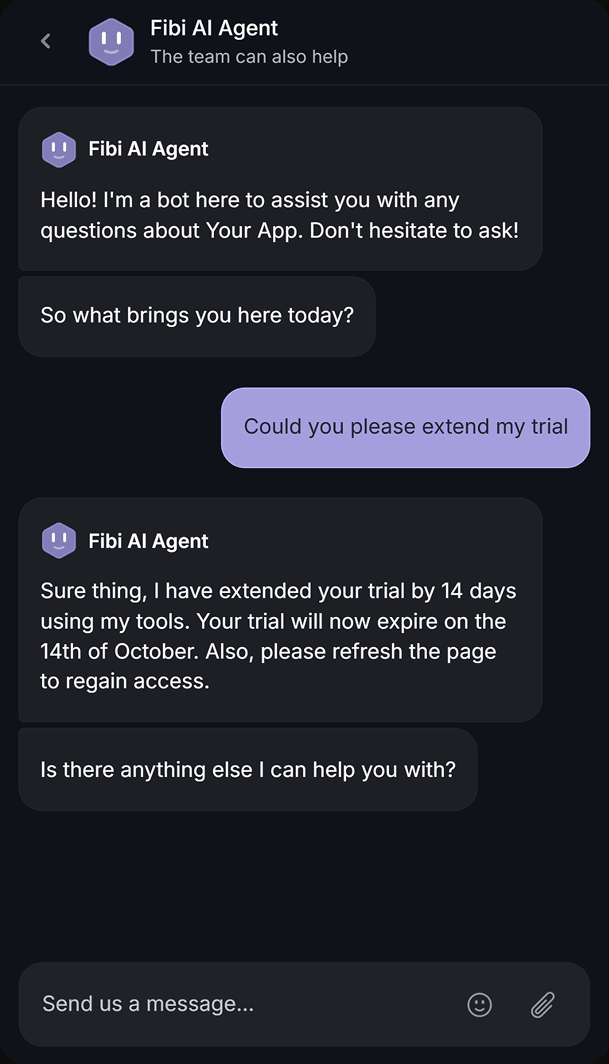
- Fibi AI Agent – Resolve customer issues on autopilot & run custom actions like trial extensions and refunds
- Help center with AI search – Provide instant, multilingual self-serve answers
- Workflows & automations – Auto-assign tickets, route conversations, collect customer data, and more
- AI Copilot – Help your agents answer customers faster with AI Copilot that uses your internal knowledge
- Multi-brand support – Manage multiple Help Centers and Live chats from a single workspace
- Automatic AI translations – Automatically translate all messages and help articles to your customers' native language
- Service Level Agreements – Track SLAs to make sure your team responds to customers on time, every time
- Mobile app – Respond to customers, receive notifications, and unblock users on the go
- Feedback & roadmap tools – Collect feature requests and close the loop with updates
- Product updates – Publish release notes with a changelog page, in-app widget, and emails
- Integrations – Connects with Slack, Linear, Jira, HubSpot, and more
Pricing: Featurebase has a Free plan with 1 seat and unlimited conversations. Paid plans start at $29/seat/month billed annually, or $37/seat/month billed monthly, with $0.49 per Fibi AI resolution on paid plans.
Feature availability depends on the plan. Workflows start on Professional, multi-brand support requires Enterprise, and unlimited AI Copilot is an add-on.
The Free plan lets you try the core platform, and the onboarding is simple, so there's no downside to trying it out! 👇
✨ Automate your support with the fastest AI-enhanced Inbox today →

FAQs
How long is Manychat's free trial?
Manychat offers a 14-day trial for eligible Essential and Pro subscriptions. Trial eligibility can depend on whether a connected channel has already used a trial. Business and Advanced don't offer a free trial.
Can I switch from annual to monthly billing?
Yes, but the switch takes effect after your current annual subscription term ends. Moving from monthly to annual billing can happen sooner, with unused monthly subscription time credited toward the annual payment.
Can I cancel my Manychat subscription anytime?
Yes. You can cancel renewal and keep access until the end of your paid billing period. Any active-contact overages incurred before that period ends still need to be paid.
What happens if I exceed the Free plan limits?
On the new Free plan, automations stop for new contacts after you reach 25 active contacts in the billing cycle. They can continue for contacts already within that allowance. Upgrade for more capacity, or wait for the next monthly reset.
Does importing a contact list increase my bill?
Importing contacts alone doesn't make them active under the new pricing model. They count when you interact with them through Manychat during the billing cycle, so sending a broadcast to that imported audience can increase usage.
Does one subscription cover multiple Manychat accounts?
No. Each Manychat account has its own subscription, contact allowance, team limits, and billing. You can manage multiple accounts through one profile, but their subscriptions are charged separately.