Blog ComparisonsFreshdesk Pricing 2026: Plans, AI Fees & Real Costs.
Freshdesk Pricing 2026: Plans, AI Fees & Real Costs.
Freshdesk pricing is split across 4 modules with add-ons that stack up fast. Here's the full 2026 breakdown of every plan, AI cost, and what you'll really pay.


✨ Psst... Looking for a more modern & powerful alternative to Freshdesk? Check out Featurebase →
Figuring out how much Freshdesk will cost for your business takes more than checking the starting price. Freshworks offers Freshdesk, Freshdesk Omni, Freshchat, and Freshcaller, with different plans and add-ons. But you don't need all four: Freshdesk Omni already includes ticketing.
Today, we'll help you make sense of Freshdesk pricing plans and help you choose the right one for your support operations. 👇
Key takeaways
- Freshdesk and Freshdesk Omni are different buying options: core email ticketing versus a unified omnichannel helpdesk. Omni already includes ticketing.
- Core Freshdesk costs $19-$89/agent/month with annual billing, or $23-$107 on monthly billing. Omni starts at $29 annually or $35 monthly.
- Freddy AI costs extra: Copilot starts at $29/agent/month on annual billing for Pro and Enterprise. AI Agent sessions cost $49 per 100 after the first 500 one-time sessions.
- The Free Program is temporary: up to two Freshdesk agents for six months. It does not apply to Omni.
- There are many more modern alternatives, including Featurebase, which provides modern AI-powered support for fast-growing teams.
| Product | Paid price per agent/month, billed annually | Key features across paid tiers | Starting cost for 10 agents, annual billing |
|---|---|---|---|
| Freshdesk (ticketing) | $19-$89 | Email ticketing, customer portal, workflows, SLAs, multilingual support | $190/month equivalent |
| Freshdesk Omni | $29-$119 | Unified ticketing and messaging, live chat, routing, multilingual tools | $290/month equivalent |
| Freshchat | $19-$79 | Live chat, messaging channels, automation, multilingual support | $190/month equivalent |
| Freshcaller | $15-$69, plus usage | Cloud phone system, IVR, call queues, recordings, supervisor tools | $150/month equivalent, plus usage |
Note: All prices are in USD. The table shows paid tiers, and features vary by plan. Freshchat also has a free plan for up to 10 agents. Freshcaller's free tier still has usage charges. Budget for the product and add-ons you need, rather than adding all four subscriptions together.
Freshdesk pricing 2026 overview
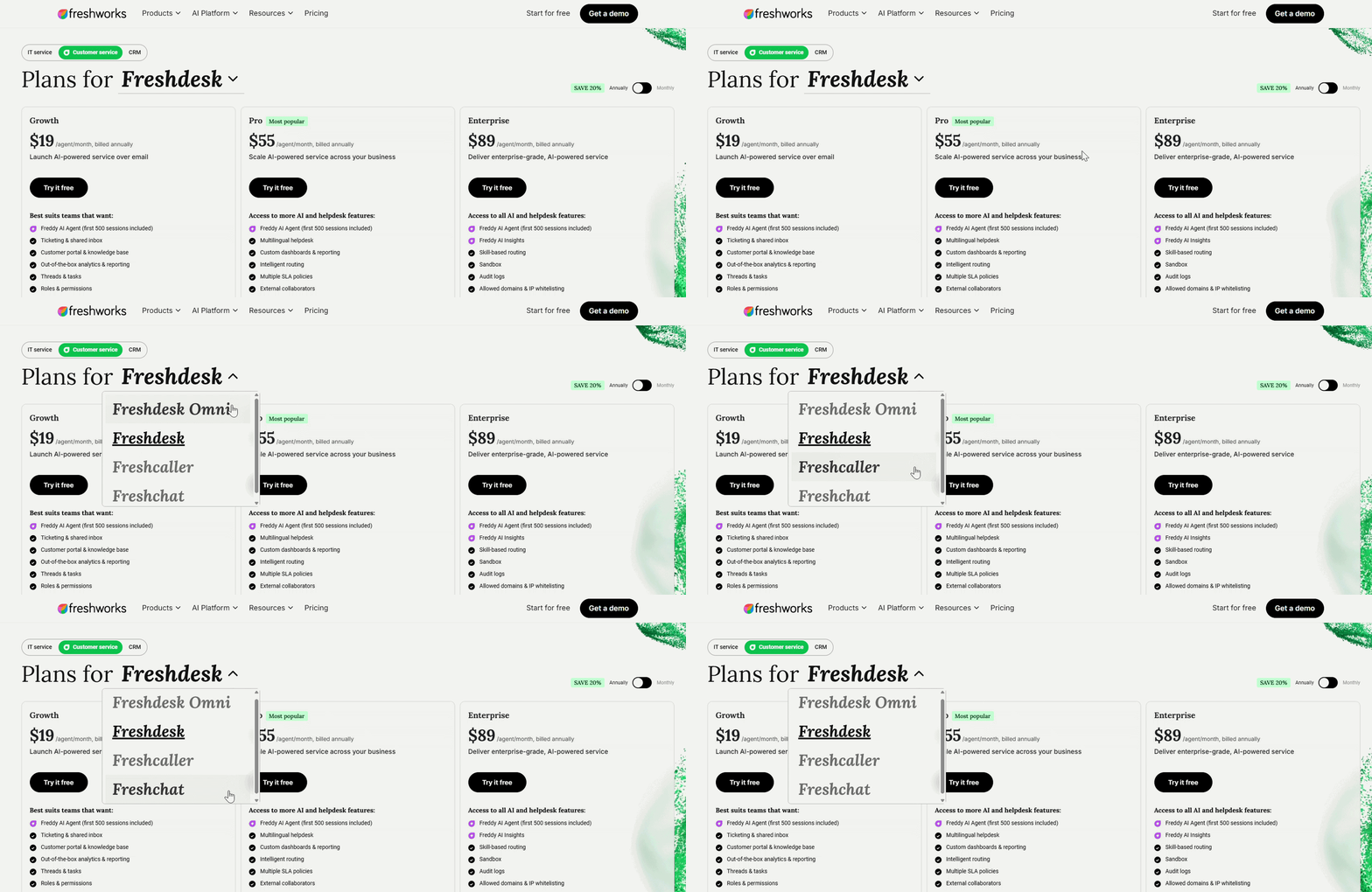
Freshworks offers four support products worth distinguishing:
- Freshdesk
- Freshdesk Omni
- Freshchat
- Freshcaller
Each has its own pricing. Start with your channels, then check the features you need:
- Choose Freshdesk for email ticketing, a customer portal, and a knowledge base.
- Choose Freshdesk Omni for ticketing and messaging in one inbox. You do not need a separate Freshdesk subscription for its ticketing features.
- Choose Freshchat for a chat-focused setup, or Freshcaller for a dedicated phone system.
- Check Pro before buying Growth if you need advanced routing, multilingual support, or Freddy AI Copilot. Enterprise adds controls such as audit logs and a sandbox.
Here's how annual and monthly billing compare for Freshdesk and Omni:
| Product and plan | Per agent/month, billed annually | Per agent/month, billed monthly |
|---|---|---|
| Freshdesk Growth | $19 | $23 |
| Freshdesk Pro | $55 | $66 |
| Freshdesk Enterprise | $89 | $107 |
| Omni Growth | $29 | $35 |
| Omni Pro | $79 | $95 |
| Omni Enterprise | $119 | $143 |
The plan headings below use per-agent monthly equivalents with annual billing. Here's what each option gives you. 👇
Freshdesk for ticketing pricing plans
If you only need a traditional ticketing system, Freshdesk's core product is the one you'll be looking at. It covers email support, customer portals, workflows, multilingual helpdesks, automations, and reporting features.
There's a Free Program ($0 for 1-2 agents, available for 6 months) if you want to test the basics, and there's a 14-day Enterprise trial. The Free Program is selected in billing and is not available after switching to a paid plan. Here's what each paid plan actually gives you and who it's best for. 👇
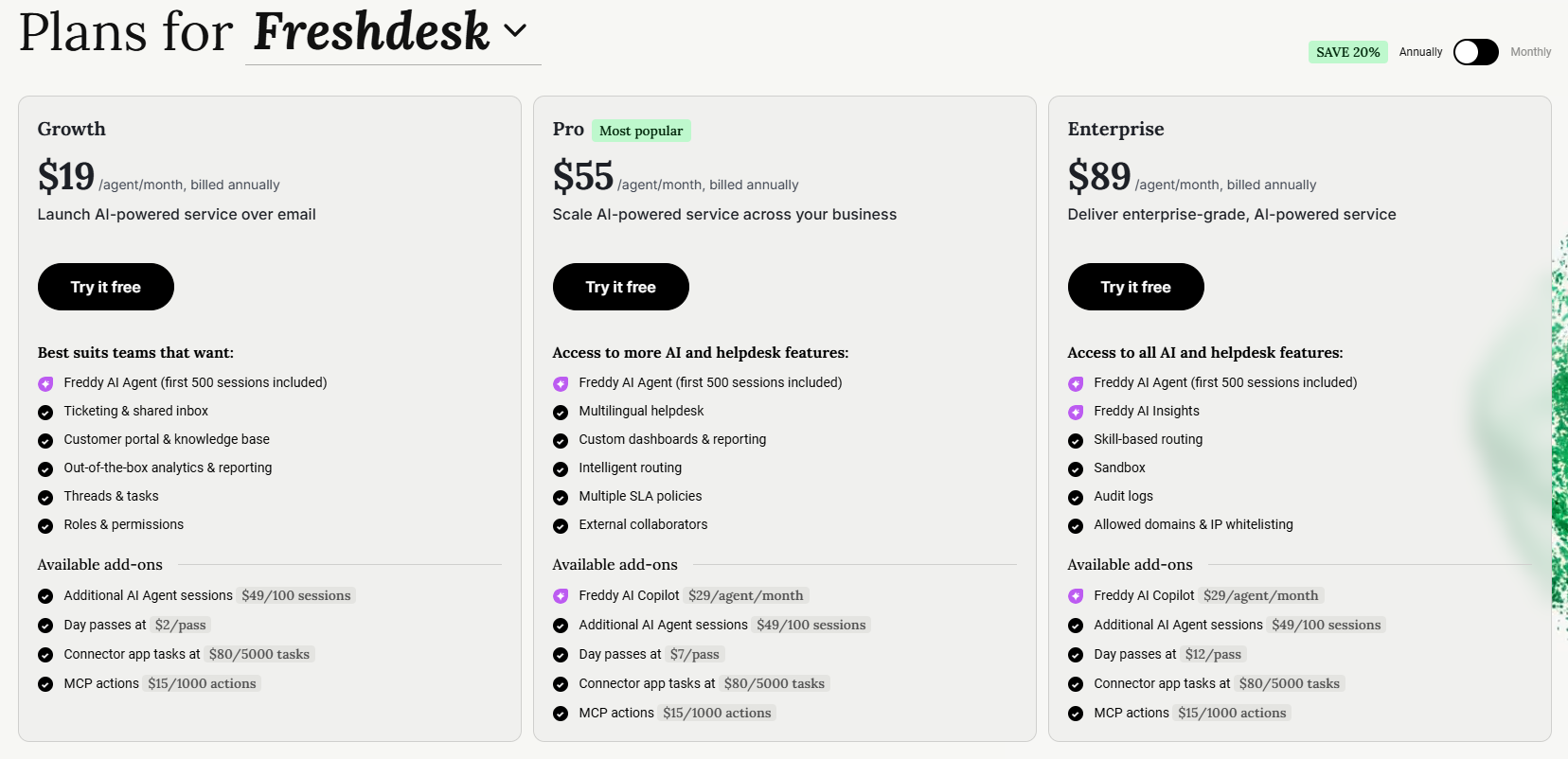
Growth plan ($19/agent/month)
Best for small teams that need a basic ticketing system with simple workflows and reporting. You get:
- Ticketing system, shared inbox, customer portal, and a basic knowledge base
- Threads and tasks for internal collaboration
- Basic automation including event and time-based triggers
- Basic ticket routing
- Standard helpdesk reporting and dashboards
- First 500 Freddy AI Agent sessions included once per account
This plan works well for simple setups, but advanced routing, multiple SLA policies, multilingual support, and Freddy AI Copilot require a higher tier.
Pro plan ($55/agent/month)
Best for growing teams that need more advanced routing, multilingual support, and stronger analytics. You get everything in Growth, plus:
- Custom support portals
- Custom objects for modeling things like subscriptions or product versions
- Advanced ticketing and routing including multiple SLA policies, round-robin, and load-balanced assignment
- Business hours across multiple time zones
- Multilingual conversations and a multilingual knowledge base
- Custom dashboards and advanced reporting
- Up to 5,000 collaborators
This plan covers most mid-sized support needs, but lacks a sandbox environment, audit logs, and skill-based routing, and it still requires purchasing Freddy AI Copilot separately.
Enterprise plan ($89/agent/month)
Best for larger teams that need advanced automation, better security, and complete control over global support operations. You get everything in Pro, plus:
- Audit logs and IP whitelisting
- Skill-based ticket assignment
- Approval workflows
- Sandbox environment for testing workflows before going live
- Custom object analysis and advanced automation
- Tools suited for large-scale, multi-region support setups
This plan has the most depth, but key AI capabilities like Freddy AI Copilot still cost extra, and AI sessions expire at the end of the billing cycle without rolling over. SSO and data center selection are available on lower paid tiers too.
Freshdesk Omni pricing plans
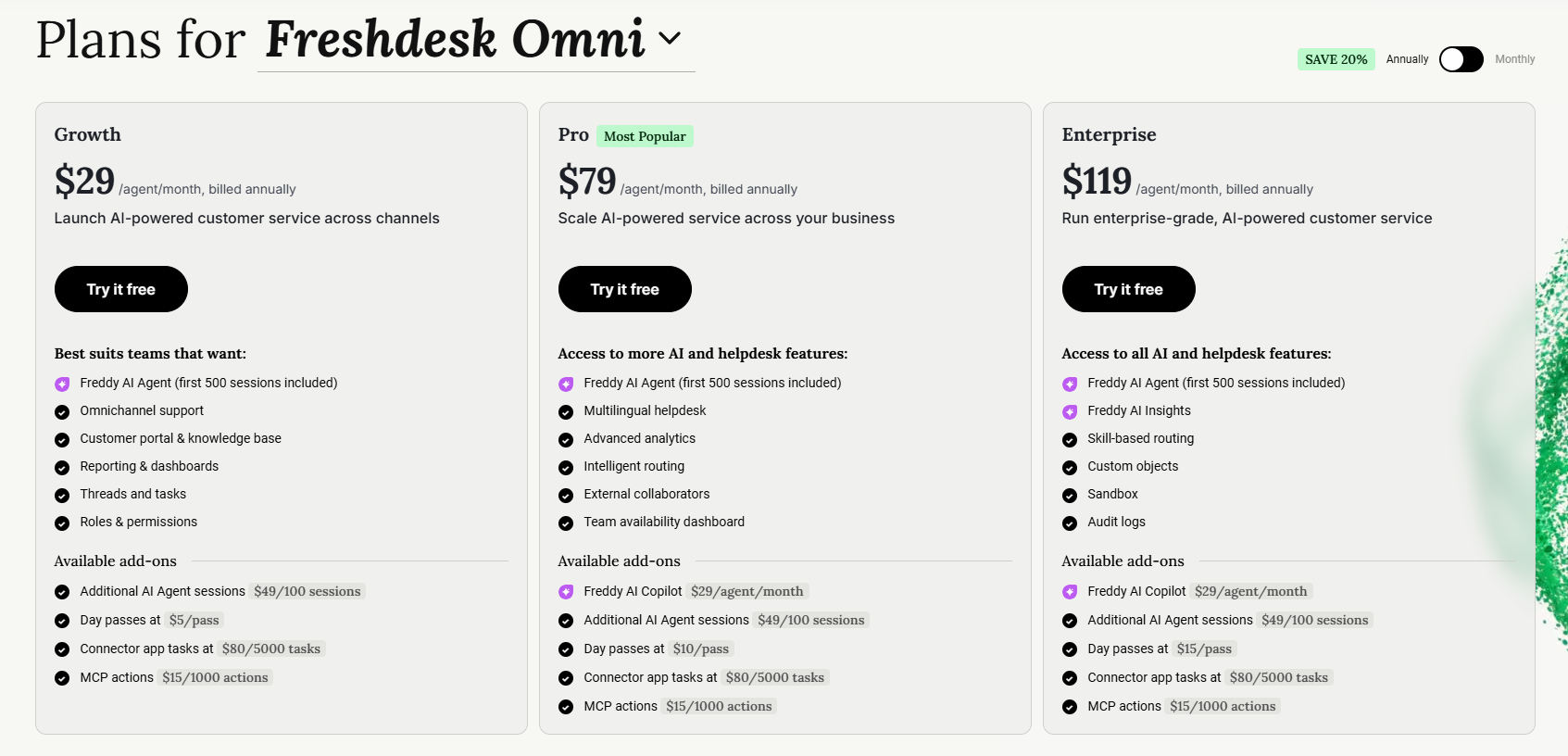
If you need to manage customer conversations across your website, SMS, email, and messaging apps, Freshdesk Omni is the upgrade you'll end up looking at.
It brings ticketing and messaging into one inbox. Its price replaces the core Freshdesk subscription for that setup, rather than automatically adding to it. Freshdesk Omni has three plans:
Freshdesk Omni Growth ($29/agent/month)
Best for small teams that want to manage support across multiple channels without adding complex routing or automation. You get:
- Omnichannel helpdesk with unified conversations across web, email, SMS, and messaging apps
- Ticketing system with customer portal and knowledge base
- Team inbox, threads, and tasks for internal collaboration
- Standard analytics and real-time dashboards
- Basic administration and security controls
- First 500 Freddy AI Agent sessions included once per account, then paid session packs
This plan is fine for basic multichannel support, but multilingual features, advanced routing, custom dashboards, and Freddy AI Copilot require a higher tier.
Freshdesk Omni Pro ($79/agent/month)
Best for growing teams that need multilingual support, deeper routing options, and more customization. You get:
- Everything in Growth
- Multilingual conversations and multilingual knowledge base
- Bring-Your-Own-Channel and Bring-Your-Own-Telephony support
- Custom portals
- Advanced ticketing and routing including Intelliassign, round-robin, and load-balanced assignment
- Custom real-time dashboards and agent availability dashboards
- Freddy AI Copilot available as an add-on
This plan adds flexibility and smarter routing, but approval workflows, skill-based assignment, and audit logs sit on Enterprise. Copilot still costs extra.
Freshdesk Omni Enterprise ($119/agent/month)
Best for larger teams that need strong security, advanced automation, and full control over global omnichannel operations. You get:
- Everything in Pro
- Skill-based ticket assignment
- Approval workflows and advanced routing rules
- Audit logs, domain and IP whitelisting, and stronger security controls
- Custom objects, agent shift scheduling, and out-of-office management
- Flexible multi-level knowledge base hierarchy
This plan unlocks enterprise automation and security, but key AI tools are still sold as add-ons and overall cost climbs quickly as usage and channels scale.
✨ Get Featurebase to automate your support with the fastest AI-enhanced Inbox today →
Freshchat pricing plans
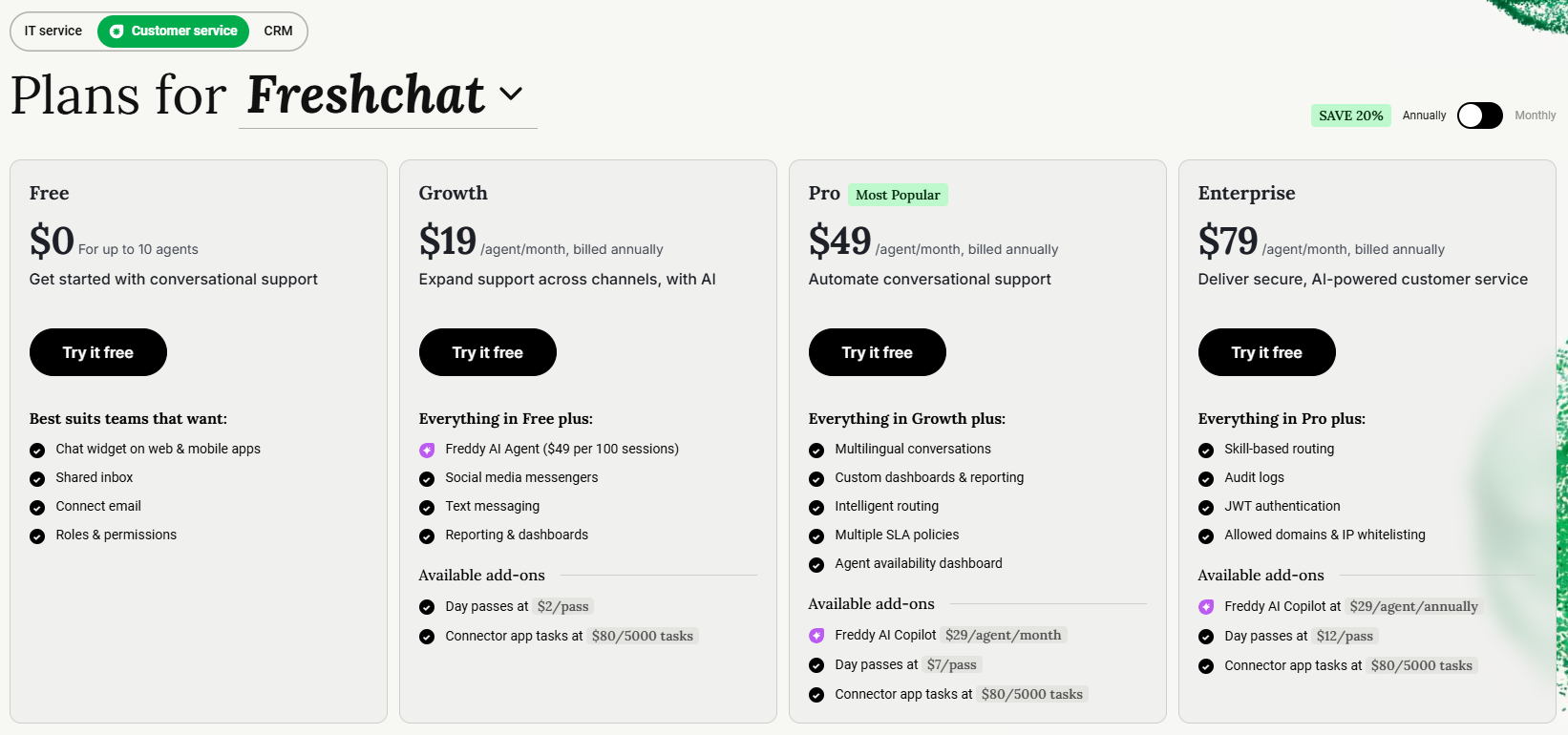
Freshchat adds live chat to your website so you can provide better customer support across another channel. You can cover multiple time zones, even when your team is offline, thanks to Freddy AI.
Freshchat Free plan
Best for small teams that need a simple live chat widget without advanced automation or routing. You get:
- Shared conversational inbox for website chat and the mobile SDK
- Basic support chat features like conversation threads, labels, and simple views
- Email connection and basic roles and permissions
- Basic integrations with common platforms
- Support for up to ten agents
This plan works for very lightweight chat support, but lacks automation, routing rules, analytics, and key messaging channels like WhatsApp or SMS.
Freshchat Growth ($19/agent/month)
Best for teams that want multiple messaging channels and starter-level automation. You get everything in Free, plus:
- Additional channels such as WhatsApp, SMS, and Instagram
- Assignment rules and canned responses
- Priority inbox and user segmentation
- Basic automation through simple triggers
- Entry-level dashboards for conversation insights
This plan is a good starting point, but it misses advanced automation, multilingual tools, skill-based routing, and deeper analytics.
Freshchat Pro ($49/agent/month)
Best for scaling teams that need multilingual chat, stronger automation, and better reporting. You get everything in Growth, plus:
- Automatic chat translation for multiple languages
- Advanced automation including auto resolution and improved routing
- Performance analytics and agent availability dashboards
- Roles and permissions for larger teams
- Conversation APIs for deeper product or CRM integrations
This plan covers most mature live chat setups, but skill-based routing, JWT authentication, audit logs, and IP restrictions sit on Enterprise.
Freshchat Enterprise ($79/agent/month)
Best for large teams that need advanced routing, stronger authentication, and higher limits. You get everything in Pro, plus:
- Full skill-based routing and advanced workflow rules
- JWT authentication for secure sessions
- Audit logs and IP restrictions
This plan offers the most control and scale, but costs rise quickly as usage increases, and AI features still require separate add-ons.
Freshcaller pricing plans
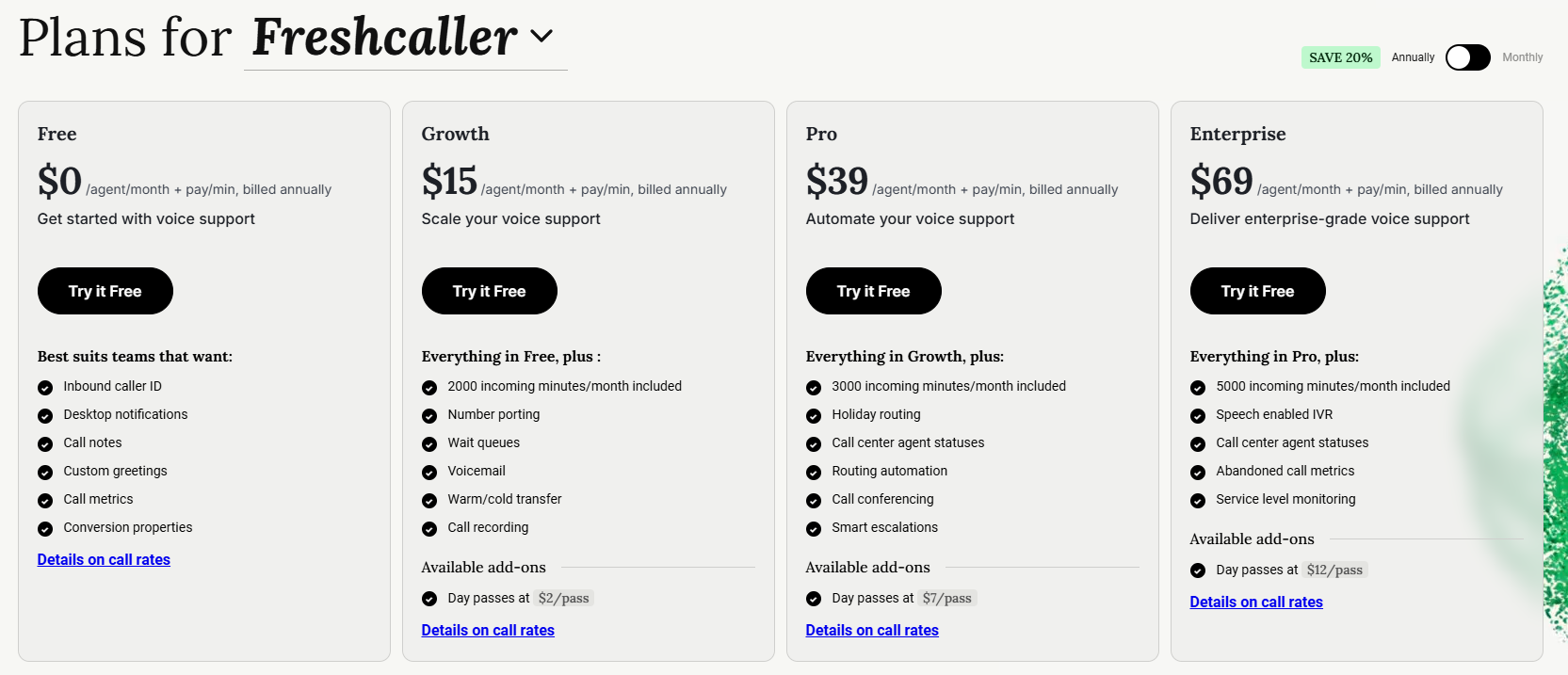
Freshcaller lets your team handle inbound and outbound phone support, purchase local or toll-free numbers, and set up call routing workflows. Each plan includes different calling features. Paid tiers include incoming minutes for the account, but number rental and additional call usage can still add to your bill.
Freshcaller Free plan
Best for very small teams that only need basic call handling with a pay-as-you-go setup. You get:
- No seat subscription fee, with number and call usage charges
- Ability to buy local or toll-free numbers
- Basic call handling including caller ID, call notes, notifications, and custom greetings
- Simple call metrics and call forwarding
- Mobile apps for iOS and Android
This plan is fine for basic phone support, but lacks call queues, recordings, transfers, analytics, and included minutes.
Freshcaller Growth ($15/agent/month)
Best for teams that want standard call center features with included minutes each month. You get everything in Free, plus:
- 2,000 included incoming minutes per month for your account
- Number porting for bringing existing phone numbers
- Call queues, voicemail, and warm or cold transfers
- Call recording, wait queues, and queue transfers
- Pre-built reports for call performance
This plan adds structure to your phone support, but lacks advanced analytics, holiday routing, IVR menus, and deeper supervisor tools.
Freshcaller Pro ($39/agent/month)
Best for growing call centers that need stronger analytics, IVR, and supervisor controls. You get everything in Growth, plus:
- 3,000 included incoming minutes per month for your account
- Holiday routing and more advanced call metrics
- Call monitoring and call barging for supervisors
- IVR menus so callers can navigate to the right team
- Agent availability reports and deeper analytics
- Support for bring-your-own-carrier and SIP connections
- Custom reports and agent extensions
This plan supports most mid-sized call centers, while Enterprise adds speech-enabled IVR and a larger incoming-minute allowance.
Freshcaller Enterprise ($69/agent/month)
Best for large phone support teams that need speech-enabled IVR and the highest included minute limits. You get everything in Pro, plus:
- 5,000 included incoming minutes per month for your account
- Speech-enabled IVR
- Service level monitoring and abandoned call metrics
This plan offers more capacity, but the seat price still isn't your complete phone bill. Check the rates for your countries, numbers, and call types.
Freshdesk AI pricing and other add-ons
The subscription covers your agents and plan features. AI assistance, AI conversations, temporary agents, and some integration usage are separate budget lines.
Freddy AI Copilot
Freddy AI Copilot helps human agents draft replies, summarize tickets, and work faster. It costs $29/agent/month billed annually, or $35 on monthly billing, on Freshdesk and Freshdesk Omni Pro and Enterprise plans.
You can buy it for selected agents rather than every seat. Growth is not eligible, so include the base-plan upgrade if your team wants Copilot.
Freddy AI Agent session packs
Freddy AI Agent handles customer conversations. Freshdesk and Omni paid plans include the first 500 sessions once per account, including Growth. After that, packs cost $49 per 100 sessions.
A session is a 24-hour interaction window for chat or a 72-hour window for email. It is not the same billing unit as a successfully resolved ticket.
Purchased sessions expire at the end of your billing cycle without rollover, and subscribed packs renew unless you reduce them. Unused free sessions are removed when you purchase a paid pack, so check your remaining allowance before upgrading. Legacy contracts may have different terms.
Day passes for temporary agents
Occasional agents can be useful during a busy period. Freshdesk day passes cost $2 on Growth, $7 on Pro, and $12 on Enterprise per agent/day. Omni day passes cost $5, $10, and $15, respectively.
Compare the number of days needed with a regular seat before relying on day passes for ongoing coverage.
Connector tasks and MCP actions
Integration usage can add another charge. Freshdesk and Omni list $80 per 5,000 connector app tasks and $15 per 1,000 additional MCP actions. MCP actions let AI interact with connected tools.
The plans include 1,200 MCP actions per year on Growth, 6,000 on Pro, and 12,000 on Enterprise. Estimate the actions your workflows will run, not just the number of apps you connect.
What Freshdesk actually costs for a real team
The per-agent price you see on the pricing page is rarely the complete budget. Once you add agents, AI, and the right product for your channels, the total changes. These examples use USD and annual billing for seats and Copilot, before tax and other usage charges.
A small team on core ticketing. Five agents on the Growth plan is the simplest case:
Total cost: 5 agents × $19 = $95/month equivalent, or $1,140 billed annually. With monthly billing, the same five seats cost $115/month.
A growing team that wants AI. Freddy AI Copilot is a separate add-on, so an AI-assisted mid-sized team adds up fast:
15 agents on Pro × $55 = $825/month equivalent
Copilot for 10 agents × $29 = $290/month equivalent
Total: $1,115/month equivalent, or $13,380 annually, before AI Agent session packs. Monthly billing would total $1,340/month.
Choosing Omni for more channels. Many buyers compare the $19 ticketing price, then realize their real workflow belongs in Omni, which starts higher:
10 agents on Freshdesk Growth = $190/month equivalent, or $2,280 annually
10 agents on Freshdesk Omni Growth = $290/month equivalent, or $3,480 annually
That extra $100/month equivalent may suit your channel mix. These are alternative subscriptions for this comparison, not two bills you automatically need to combine.
AI sessions on top. After the one-time free allowance is used, 2,000 paid sessions cost:
2,000 ÷ 100 × $49 = $980 in AI Agent session packs.
If you budget for 2,000 paid sessions every month, that is $11,760 over a year, plus seats. Match pack purchases to your billing cycle and actual usage, since unused sessions do not roll over. Do not subtract the free 500 sessions from every month's forecast.
If you want to see how Freshdesk's AI stacks up before committing, model your real session volume first.
What if Freshdesk is too expensive for me?
If Freshdesk's pricing, AI session packs, and add-ons start to push your budget too far, you are definitely not alone. Many teams eventually look for simpler tools with clearer pricing. Here are the best alternatives to consider:
- ✨ Featurebase - Best modern support & feedback platform for fast-growing SaaS
- Zoho Desk - Budget-friendly omnichannel desk with a knowledge base
- Intercom - Messaging-first support with contextual help and automation
- Zendesk - Omnichannel desk with enterprise-ready knowledge base tools
- ProProfs - Simple ticketing with built-in knowledge base and chat
- Tidio - Chat-first support with embedded FAQ and chatbot features
- Help Scout - Email-based help desk with conversational live chat and docs
- Kustomer - Robust customer support software with customer timeline
- Hubspot Service Hub - CRM-native help desk with knowledge base
- Crisp - Messaging-first platform for growing teams
You can read a more in-depth review of the best Freshdesk competitors in our comparison, or see how it stacks up head-to-head in our Freshdesk vs Zendesk breakdown.
So, is Freshdesk worth it?
Freshdesk pricing is very complicated if you want more than the basic ticketing features. There are also hidden costs (such as AI working on a limited number of tickets), and some of the best features are reserved for higher-tier plans. Not only do you have to choose a module that works best for your business, but you also have to choose one of the Freshdesk plans in each one to make sure it meets your needs. If you want a deeper look at the product itself, our full Freshdesk review goes beyond the price tag.
Featurebase is a modern AI customer support platform for product-led SaaS. It combines AI-powered support, a help center, and feedback management in one place, so you get all the essentials of a legacy help desk, plus a mobile app and product updates, in a much more affordable package. It's loved by thousands of support teams from companies like Lovable, Polymarket, and Raycast. 💫
Top features:
- Omnichannel inbox – Manage live chat, email, and Slack conversations from one AI-powered view
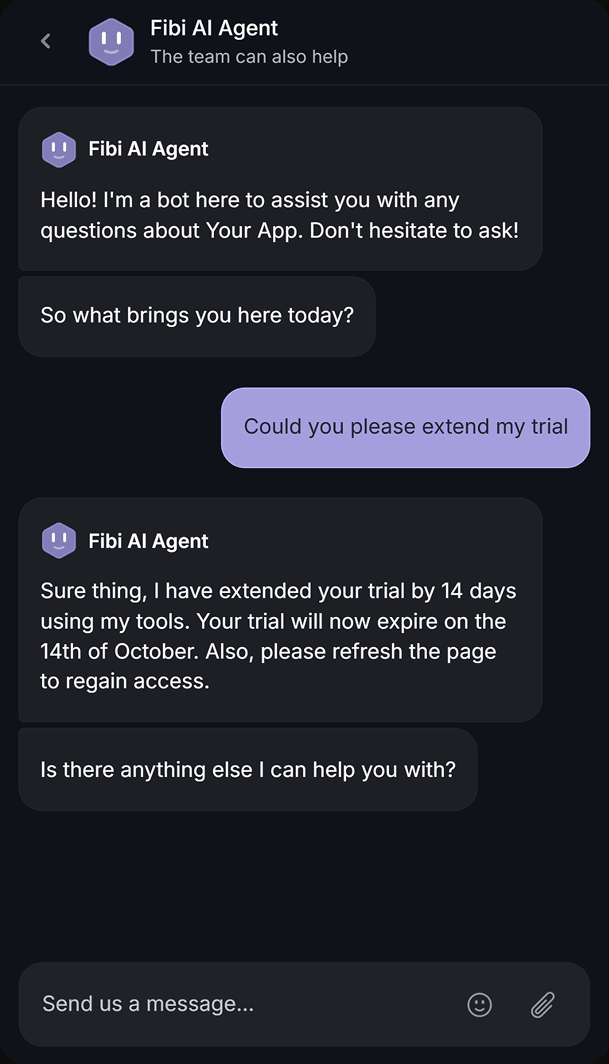
- Fibi AI Agent – Resolve customer issues on autopilot & run custom actions like trial extensions and refunds
- Help center with AI search – Provide instant, multilingual self-serve answers
- Workflows & automations – Auto-assign tickets, route conversations, collect customer data, and more
- AI Copilot – Help your agents answer customers faster with AI Copilot that uses your internal knowledge
- Multi-brand support – Manage multiple Help Centers and live chats from a single workspace
- Automatic AI translations – Automatically translate all messages and help articles to your customers' native language
- Service Level Agreements – Track SLAs to make sure your team responds to customers on time, every time
- Mobile app – Respond to customers, receive notifications, and unblock users on the go
- Feedback & roadmap tools – Collect feature requests and close the loop with updates
- Product updates – Publish release notes with a changelog page, in-app widget, and emails
- Integrations – Connects with Slack, Linear, Jira, HubSpot, and more
Unlike Freshdesk's four separately-priced modules, Featurebase comes with a Free plan, with paid plans starting at $29/seat/month and $0.49 per AI resolution, so there's no downside to trying it out. 👇
Featurebase covers all the basic support features that legacy platforms do, but with a much more modern approach. It comes with AI automations, a mobile app, and multiple channels (email, live chat, Slack, etc.). Try the free plan to see how it fits your team. 👇
✨ Automate your support with the fastest AI-enhanced Inbox today →
FAQs
How much does Freshdesk really cost per agent?
Core Freshdesk costs $19, $55, or $89/agent/month on annual billing, depending on the plan. Monthly billing costs $23, $66, or $107. Add eligible Copilot seats, AI Agent session packs, and any other usage charges to estimate your total.
Does Freshdesk have a free plan?
Yes, but it's time-limited. Freshdesk's Free Program gives 1-2 agents core helpdesk features at $0 for six months. It does not apply to Freshdesk Omni. There's also a 14-day Enterprise trial to test higher-tier features before committing.
How much do Freddy AI Copilot and AI Agent sessions cost?
Copilot costs $29/agent/month billed annually or $35 monthly on Pro and Enterprise. You can license selected agents. AI Agent costs $49 per 100 sessions after the first 500 one-time sessions included with paid Freshdesk and Omni plans. Unused sessions expire at the end of the billing cycle.
What is the difference between Freshdesk and Freshdesk Omni?
Freshdesk focuses on email ticketing and a customer portal. Omni combines ticketing with live chat and messaging channels in one inbox. Omni starts at $29/agent/month billed annually, versus $19 for Freshdesk. Its ticketing features do not require a separate core Freshdesk subscription.
Can I upgrade or downgrade my Freshdesk plan?
Yes. You can upgrade your subscription instantly at any time. Downgrades and cancellations only take effect at the end of your current term, and you manage them from the billing area of your Freshdesk account.
Does Freshdesk charge cancellation fees?
Freshdesk does not charge a separate cancellation fee. Cancellation takes effect at the end of your current billing term rather than immediately. This does not mean an annual subscription is refunded when you stop using it partway through the year.
Does Freshdesk offer discounts or annual savings?
Annual billing lowers the per-agent rate. For example, Growth costs $19 instead of $23, while Pro costs $55 instead of $66. That is roughly 17% less for those plans. Ask sales about any current startup offers or negotiated terms, rather than assuming a discount is guaranteed.